SCHEDULE ANALYSIS · Updated November 4, 2026
DCMA 14-point schedule assessment explained
The DCMA 14-point assessment is a set of schedule health checks. It helps you find weaknesses in logic, dates, durations and progress tracking before relying on a project forecast.
Where it came from
DCMA stands for the United States Defense Contract Management Agency. The assessment grew from defense-program schedule oversight: reviewers needed repeatable ways to examine schedule structure and execution. GAO's December 2015 Schedule Assessment Guide documents the 14-point approach. It describes the checks as a starting point for analysis, rather than a substitute for professional review. Source: GAO Schedule Assessment Guide, Appendix III.
What is it used for?
Use the checks when reviewing a contractor submission, preparing a monthly update or investigating why the critical path looks unreliable. A flagged activity is a question to investigate. A passing result does not prove that scope, productivity, resources or risk assumptions are realistic.
Unlike Monte Carlo risk analysis, these checks examine schedule health rather than generate a distribution of possible completion dates.
The 14 checks
The table summarizes the assessment categories and the current XER Viewer defaults. These are app settings, not a statement that every contract requires the same thresholds. Review your project's requirements and the app's criteria before running.
| Check | Question to investigate | XER Viewer default |
|---|---|---|
| 1. Logic | Is remaining work missing predecessor or successor logic? | ≤ 5%; start/finish milestones exempt |
| 2. Leads | Do negative lags obscure the sequence? | 0 |
| 3. Lags | Are positive lags hiding work that deserves its own activity? | ≤ 5% |
| 4. Relationship types | Does the network rely heavily on relationships other than finish-to-start? | ≥ 90% FS |
| 5. Hard constraints | Are mandatory dates overriding network-driven dates? | ≤ 5% |
| 6. High float | Could unusually large float indicate disconnected logic? | ≤ 5% over the app's 44-working-day threshold |
| 7. Negative float | Does the plan conflict with required dates? | 0% |
| 8. Long duration | Is incomplete work too coarsely planned? | ≤ 5% with baseline duration over 44 working days; linked baseline needed |
| 9. Invalid dates | Are actual dates after the data date, or forecast dates before it? | 0% |
| 10. Resources | Are incomplete task-dependent activities missing assignments? | ≤ 1% |
| 11. Missed tasks | Was work due by the data date completed against the baseline? | ≤ 5%; linked baseline needed |
| 12. Critical path test | Does delaying critical work move project completion? | Manual test; excluded by default |
| 13. CPLI | How does remaining critical-path length compare with available time? | Target ≥ 0.95; not implemented |
| 14. BEI | How many activities were completed compared with the baseline count due? | Target ≥ 0.95; not implemented |
Run the assessment in XER Viewer
- Open the XER file and verify the project and data date. For baseline-dependent checks, the file needs the explicitly linked baseline project, not just planned dates in the current project.
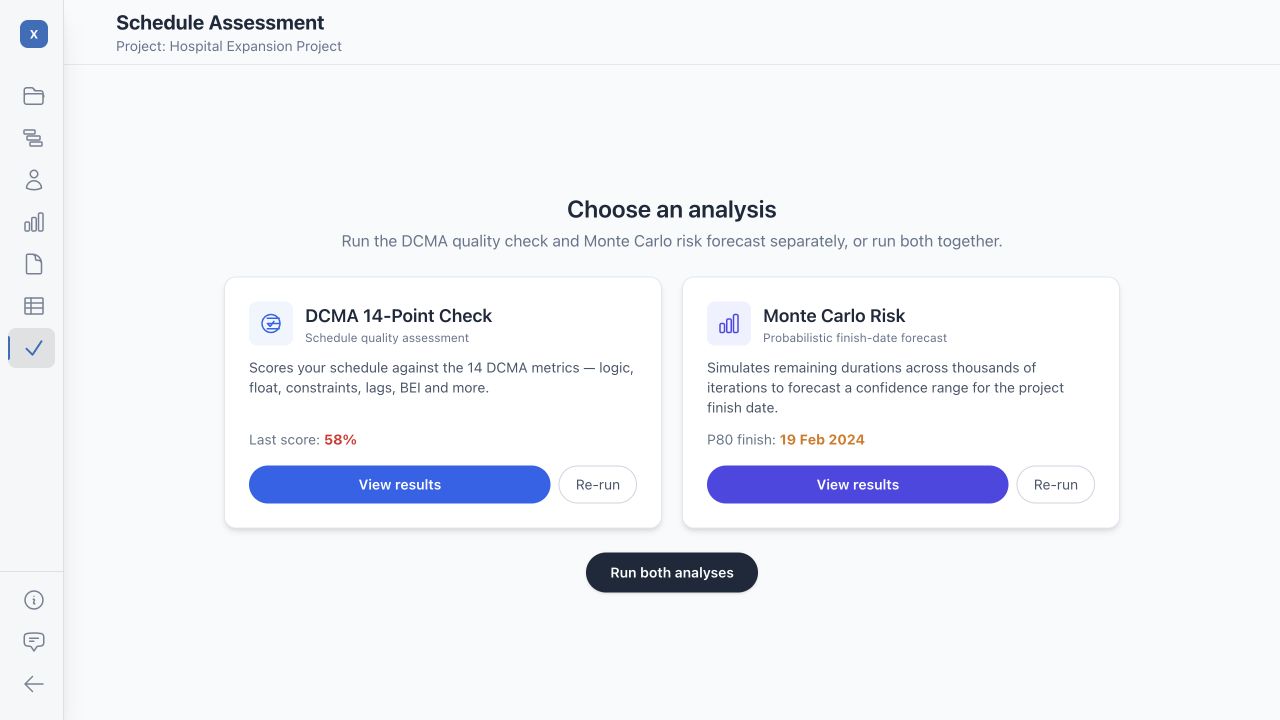
- Choose Schedule Check in the left navigation. On the Schedule Assessment screen, select Run DCMA Check, or reopen existing findings with View results.
- Review the criteria. Choose which rules to include, edit targets and weights where needed, and recalculate after changes. Record custom settings so later scores are comparable.
- Inspect each rule card. Read the metric, target and available activity findings. Investigate the IDs and descriptions with the scheduler instead of relying only on the overall score.
- Print or save the assessment. Use the assessment toolbar's Print control to preview the report, then print it or save a PDF.
- Correct the source schedule and rerun. XER Viewer reviews the export; it does not repair the original Primavera project for you.
What XER Viewer does and does not check
The app lists all 14 criteria, but the critical-path test requires manual work and CPLI and BEI are not implemented. These three are excluded by default. Enabling a criterion does not make an unavailable calculation available. Rules missing required baseline data are also marked unavailable.
The total score is the app's weighted summary of included, available rules. Unavailable checks are not evidence of a pass and do not contribute as successful checks. The score is not DCMA certification or an official compliance decision.
Read findings in context
A long procurement activity might justify its duration; a negative lag might reveal a better way to model overlap. Review the work with its owner and document the rationale. Do not remove real constraints, shorten work or add artificial links only to improve the score.
Counts can differ across tools because of activity exclusions, working-day conversions, baseline availability and relationship populations. Compare the actual rule definitions and affected activities before comparing headline percentages.